Main menu


You are here
Pidgin XEP-0136 Plugin
XEP-0136 is an XMPP protocol extension used for storing and accessing message archives. Daniel Kraic has written a Pidgin plugin for accessing these archived messages. Below are the brief instructions for installing this plugin in Debian and using it. Generic installation instructions can be found in INSTALL file.
Installation:
- Download the plugin (https://github.com/danielkraic/Pidgin-XEP-0136-plugin/tags) and extract it.
# unzip danielkraic-Pidgin-XEP-0136-plugin-v0.6-0-g74aea04.zip
# cd danielkraic-Pidgin-XEP-0136-plugin-b22950b
- Install build dependencies and Pidgin headers
# apt-get install gcc
# apt-get install pidgin-dev
- Build the plugin.
# make xep136_plugin.so
- Copy the plugin.
# mkdir ~/.purple/plugins/
# cp xep136_plugin.so ~/.purple/plugins/
- To enable the plugin, start Pidgin, go to Tools -> Preferences and enable XEP-0136 plugin.
Author Notes:
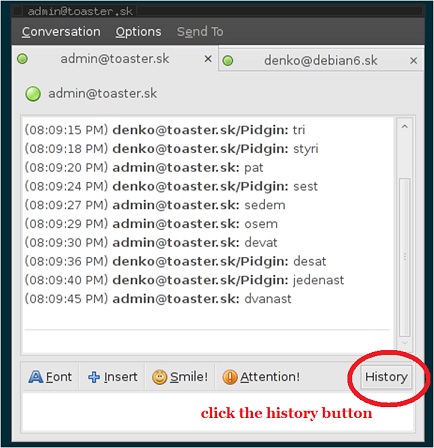
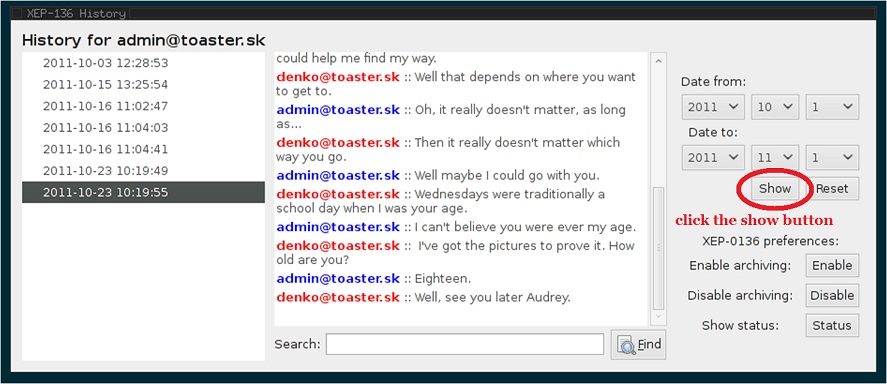
You can access history by clicking the "HISTORY" button located at the bottom of Pidgin conversation window. Then "XEP136" window should appears. Next click the "SHOW" button on the right of "XEP-136" window to see list of conversation dates on the left. Select conversation date to see its content.
It is assumed that you use XMPP server with XEP-0136 extrension support. Ejabberd IM server should works with "mod_archive_odbc" enabled as well as Prosody IM server with "archive" module enabled.
Feel free to report bugs. Check for future updates at https://github.com/danielkraic/Pidgin-XEP-0136-plugin
Screenshots:
 del.icio.us
 Digg
Digg Facebook
 Google
 identi.ca
 LinkedIn
 Ping This!
 Reddit
 SlashDot
 StumbleUpon
 Favorite on Technorati
 Twitter
 Yahoo
YahooSyndicate

Recent blog posts
- Relocation to London
- The Ultimate Hack for Chewing Food Properly
- Work environment upgrades
- Roopkund Trek - Summing up my experience
- Roopkund Trek - Day 9: Driving back to Kathgodam and heading for home
- Roopkund Trek - Arriving at Hyderabad
- Roopkund Trek - Day 8: Return to basecamp Lohajung
- Roopkund Trek - Day 6: Reaching the highest campsite - Bhagwabhasa (altitude: 14100 ft)
- Roopkund Trek - Day 7: An attempt to reach Roopkund and down to Bedni Bugyal
- Roopkund Trek - Day 5: Heading for the next higher campsite - Patar Nachauni (altitude: 12700 ft)
Recent comments
- Wow. You have mentioned every 5 years 5 months ago
- Glad that the information 6 years 1 month ago
- Thank you very much Rahul. 6 years 1 month ago
- Sorry, but I don't know what 6 years 3 months ago
- What do we call "vatti vella 6 years 3 months ago
- Very descriptive and useful 6 years 7 months ago
- I had submitted the originals 6 years 9 months ago
- Hi Rahul, 6 years 9 months ago
- I don't recollect paying any 7 years 3 months ago
- What about Court fees? How 7 years 3 months ago
Comments
Do you know if there's a
Do you know if there's a chance for having the plugin for windows?
It may be possible to cross
It may be possible to cross compile this plugin for windows. And it may work in windows. I suggest you contact the upstream author to know about this.
A windows version now seems
A windows version now seems to be available - https://github.com/danielkraic/Pidgin-XEP-0136-plugin/downloads
Add new comment